
[Introduction Summary] In the past two years, countless film and television teams and commercial companies have plunged headlong into the wave of virtual production, but the vast majority of works reveal their shortcomings the moment they are presented: the scenes are fine 3D assets worth thousands of yuan, rendering uses top-tier RTX 4090s, yet the image on the monitor simply exudes an indelible sense of fakeness—characters look like stickers, edges carry a plastic sheen, and camera movements are as smooth as a video game. Even if viewers understand nothing about post-production technology, their brain's biological instincts will judge within a second: this is fake. The core of truly top-tier virtual production has never lain in how expensive a screen or how flashy an asset was purchased, but in how to systematically “forge reality.” This article will break down four core secret techniques that Hollywood VFX supervisors never readily share, teaching you how to convincingly recreate million-dollar cinematic quality on a small budget within a modest green screen space.
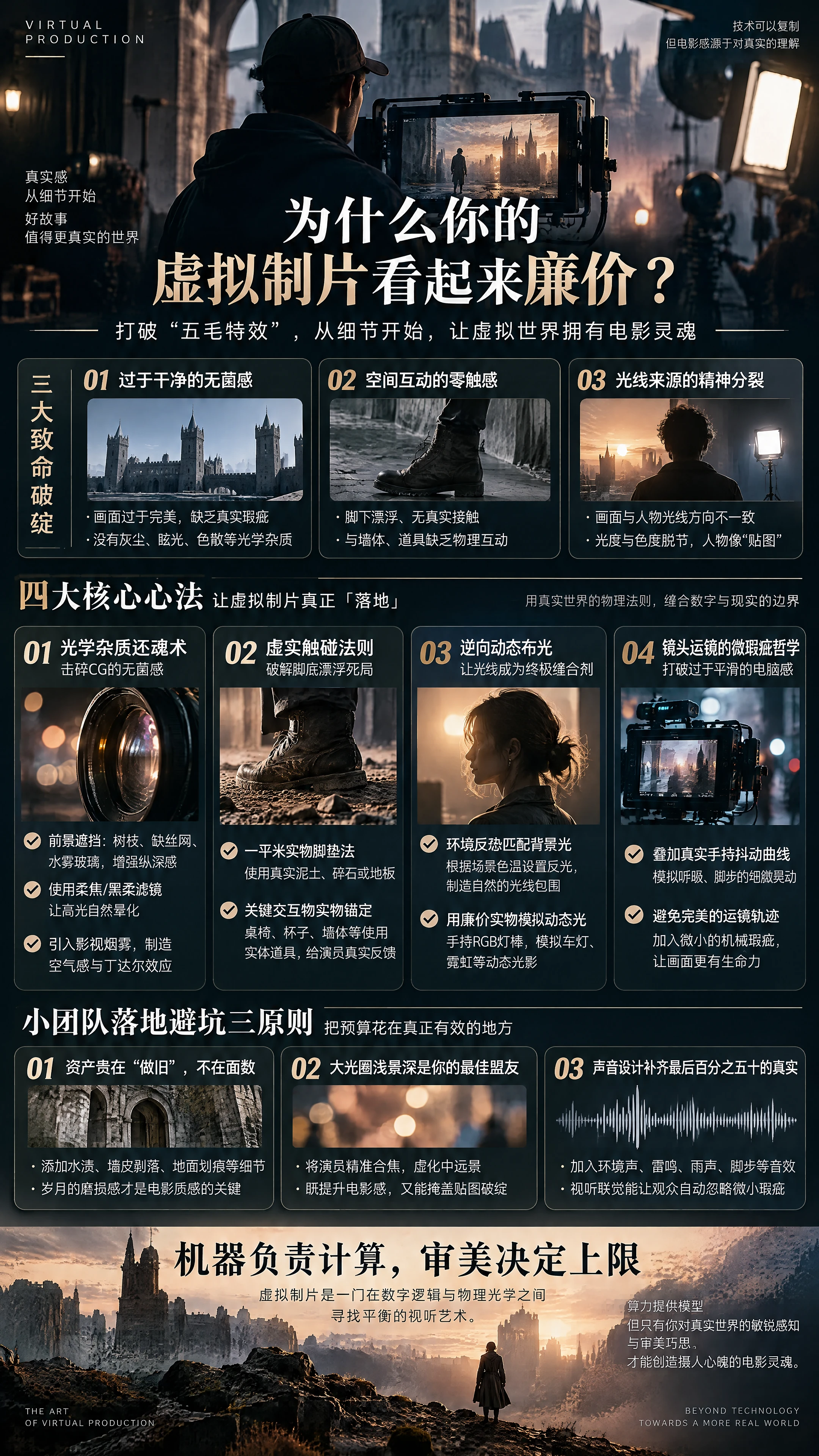
I. Why Does Your Virtual Production Look Cheap?
The human brain has evolved over millions of years and possesses an extremely rigorous instinct for recognizing the optical laws of the physical world. When the following three fatal flaws appear in the image, the label of “cheap effects” is permanently welded onto the final cut:
The first is “an overly clean, sterile feel.” Images computed by real-time rendering engines are often too perfect: straight lines are as straight as if laser-calibrated, materials have not a speck of dust, and depth-of-field blur resembles a uniform Gaussian blur. But optical lenses in real life are full of imperfections—chromatic aberration at the edges, breathing effects, dust particles in the air, and glare from oil smudges on the lens. Without these “physical impurities,” the image inevitably slides toward low-quality game CG.
The second is “zero tactile sense of spatial interaction.” An actor stands in a virtual castle, yet the ground beneath their feet is as flat as if floating in a vacuum; walking past a weathered stone wall, there is no physical distance-based occlusion or scraping between clothing and wall; even when the actor reaches out to push a virtual wooden door, their fingers hover in the air. This disconnect of “visual interaction but physical insulation” instantly shatters the audience's immersion.
The third is “schizophrenia in light sources.” The 3D background clearly shows a glaring backlit sunset, yet the key light hitting the actor's face comes from a softbox in front; the neon lights in the background image flash wildly, yet the reflections on the actor's shoulders remain completely static. This directional disconnect in photometry and colorimetry is the number one killer that makes characters look like “hard-cut stickers.”
II. Technique One: The Art of Optical Impurity Resurrection—Shattering CG's Sterile Feel
To give cold, rigid 3D engine images a film-like breathing quality, the first step is to actively “poison” the lens and pipeline by artificially implanting real-world optical imperfections.
- Physical Occlusion and Foreground Fabrication Cinematographers never let the subject stick nakedly against the background. Between the green screen and the camera, even just placing a rough real tree branch, half a piece of rusty wire mesh, or a sheet of acrylic glass sprayed with water mist as foreground occlusion will immediately multiply the image's sense of depth. When the camera moves, the real foreground object, the mid-ground actor, and the background virtual scene translate at different parallax speeds, and the audience's brain instantly constructs a deep three-dimensional spatial cognition—the originally flat green screen composite immediately gains a sense of air.
- Reverse Implantation of Lens Optical Characteristics Do not use overly modern industrial lenses with excessive sharpness—that amplifies the harshness of digital edges. • Make good use of soft-focus and black mist filters: attach a 1/8 or 1/4 black mist filter in front of the physical lens; it produces a natural halation and diffusion of highlights, softens harsh keying edges, and allows the foreground and background to blend naturally at the optical level. • Introduce airborne particle media: release a very thin layer of theatrical haze in the green screen studio in appropriate amounts. The haze particles are almost imperceptible to the naked eye, but the faint Tyndall effect produced when light passes through the air endows the image with a stunning film-like texture.
III. Technique Two: The Law of Physical-Virtual Touch—Solving the Floating Feet Deadlock
Eighty percent of the biggest disasters in virtual-physical integration occur at the actor's feet and hands. The moment viewers see where the heel contacts the ground, authenticity is instantly judged. Small teams do not need million-dollar physical prop sets—they only need to follow the golden rule that “contact surfaces must be physicalized”:
- The One-Square-Meter Physical Foot Mat Method If the virtual scene is a gravel beach, never let the actor stand directly on flat green screen floor vinyl! In the core active area where the actor stands, lay down two square meters of real soil, real gravel, or a few pieces of real distressed wood flooring, letting the physical ground extend half a meter behind the actor's heels, then splice it with the green screen floor. This way, the real mud debris splashing when the actor steps, the natural creasing of the shoe sole under pressure, and the absolute physical contact shadow of the shoe landing are all captured in-camera. The virtual engine only needs to take over the distant ground beyond half a meter, and the “floating feet” problem that originally demanded extreme keying skills is effortlessly solved.
- Physical Anchoring of Key Interactive Objects In the story design, if a character needs to lean against a wall to rest, place a matte-black-painted wooden board in front of the green screen as a physical wall to lean on; if the character needs to pick up a cup from a table, the cup and table must be physical props. Physical props provide actors with genuine weight feedback and muscular support, completely eradicating the floating movements and wandering gaze caused by “performing without physical objects.”
IV. Technique Three: Reverse Dynamic Lighting—Making Light the Ultimate Stitching Agent
Lighting is not for illuminating the actor; lighting is the thread that “stitches” the virtual and physical worlds together. The advanced lighting logic is always: first look at what light exists in the background, then decide what lights to place on set.
- Physical-Level Restoration of Environmental Color Bleed When a person stands in front of a bright window or in daylight, the highlight spill from the background will inevitably consume some detail at the edges of the human body. Many low-end green screen composites desperately resist color spill, wanting to cut the actor's edges as sharp as a knife—which ironically results in cheap-looking stickers. The advanced approach is to actively introduce environmental color bleed: place a high-power flat panel light softened through a large sheet of diffusion paper behind the actor, with color temperature strictly matched to the key light source in the virtual background (e.g., 3200K warm yellow at dusk, 6500K cool blue during a storm). Let this reflected light deliberately hit the actor's shoulders and hair tips, physically creating a translucent sense of light wrapping around and enveloping the character.
- Low-Cost Physical Simulation of Dynamic Light Sources Many teams assume that dynamic flowing light effects must be achieved through complex DMX intelligent lighting array synchronization. In fact, a three-digit budget trick can achieve the same effect: when shooting nighttime car scenes or corridor running scenes, have an assistant hold a cheap RGB full-color handheld light wand, standing outside the camera's line of sight. Following the rhythm of cars brushing past and streetlights sweeping by in the background, manually wave a dynamic light patch across the actor's head and side face. This dynamic light and shadow full of randomness and physical falloff presents an extremely sophisticated sense of dynamic immersion on the monitor.
V. Technique Four: The Micro-Imperfection Philosophy of Camera Movement
Why do so many virtual production images look like computer animation at first glance? Because the virtual camera's movement trajectory is too “smooth.”
In real film shooting, even with the most expensive Steadicam or heavy-duty telescoping crane, the photographer's breathing, the subtle undulations of footsteps, and the inertial rebound of mechanical pivots at start-stop moments all inject imperceptible micro-jitters and rhythmic lag into the image. These subtle mechanical imperfections are precisely the soul of Hollywood's cinematic texture.
In virtual production, never directly apply the perfect camera movement curves drawn with Bezier curves in 3D software. The best practice for small teams is: even without a professional spatial tracking system costing tens of thousands of yuan, you can overlay onto the 3D engine's virtual camera a “handheld micro-jitter noise curve” genuinely recorded and captured from a handheld camera; or have the cinematographer hold a physical camera and capture their real breathing undulations through affordable motion capture equipment to drive the virtual lens. It is precisely this sub-millimeter organic jitter that thoroughly shatters the rigid computer-software feel of the image.
VI. Three Pitfall-Avoidance Principles for Small Teams
On the path to pursuing cinematic texture, many teams exhaust their budgets in the wrong direction. Remember these three life-saving principles:
- Assets Value “Weathering,” Not Polygon Count Many 3D scene models purchased for a few hundred yuan in shopping malls look fake because the materials are too new and too neat. Scenes with genuine cinematic texture must have water stain textures, peeling wall paint, floor scratches, and corner ambient occlusion manually added to materials in Unreal Engine. Visual depth is often hidden in the sense of wear accumulated over time.
- Depth of Field Is Your Best Ally and Your Fig Leaf Never use a small aperture to render the entire virtual scene in exhaustive clarity. A large aperture with shallow depth of field is the ultimate escort of virtual production. Precisely focus on the actor's face and push the mid-to-far range of the virtual background into a beautiful optical bokeh circle of confusion—this not only instantly distills a strong cinematic optical quality but also silently conceals texture flaws and edge seams on the 3D background models.
- Sound Design Completes the Final Fifty Percent of Realism Film is a comprehensive audiovisual art. For a rainy night shot filmed in front of a green screen, if the audio track contains only dry, flat vocal recordings, the audience's subconscious will feel the background is fake; but as long as the mix track is filled with richly layered environmental spatial acoustic reverb—distant low rumbling thunder, the crisp patter of raindrops on sheet metal, the sound of puddle splashes approaching from far to near—the human brain's synesthetic mechanism will automatically “fill in and cover up” the minor visual flaws, making the sense of realism impregnable.
VII. Conclusion: Machines Handle Computation, Aesthetics Determine the Ceiling
Virtual production is by no means an arms race of hardware supremacy. It is an art of deceiving the eye, an audiovisual science of finding the beautiful balance between digital logic and physical optics.
While many teams are still fixated on competing over whose graphics card has more computing power or whose LED wall has a tighter pixel pitch, truly smart creators have long since poured their energy into a real tree branch, a piece of distressed flooring, a wisp of faint haze, and a carefully crafted bleed of reflected light. Computing power can only provide sterile, cold models—only your keen perception of the real world and aesthetic ingenuity can inject a captivating cinematic soul into virtual scenes.

 简体中文
 English