
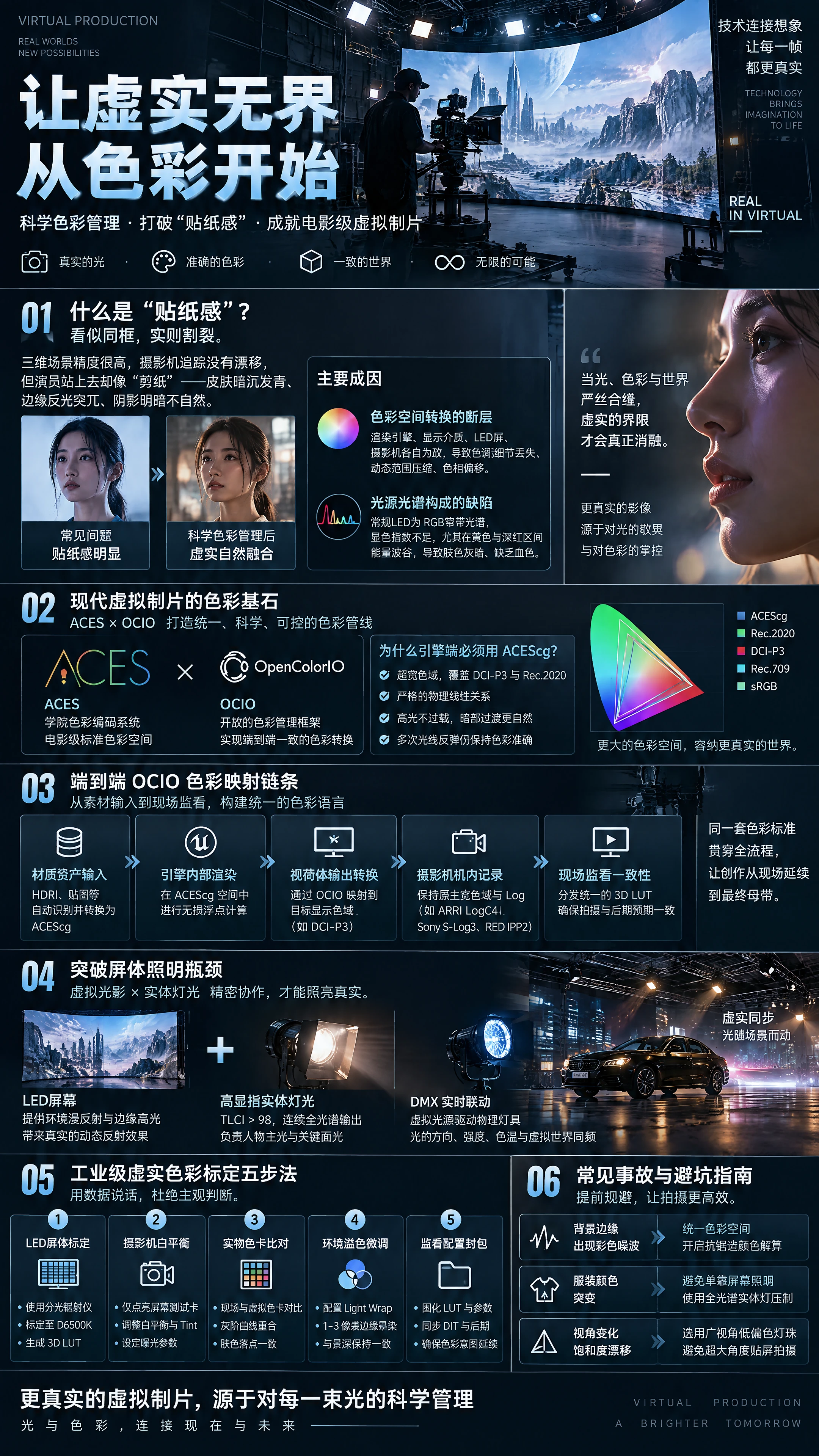
[Introduction Summary] In front of the live-action monitors of virtual production and virtual studios, a frustrating phenomenon often occurs: the 3D scene model assets are extremely high-precision, and the camera tracking has no drift whatsoever, but as soon as an actor steps onto the set, the entire person looks as if they were cut out with cheap scissors and pasted onto a background image—skin dull and bluish, edge reflections jarring, and shadow contrast bizarre. This visual flaw, known as the “sticker effect,” is essentially a break in the color management pipeline and a mismatch of physical photometric characteristics. To completely dissolve the boundary between virtual and real, it is not enough to rely on a colorist manually patching things up in post-production; instead, an end-to-end color closed loop spanning the rendering engine, display medium, physical lighting, and camera sensor must be established on set.
I. Causes of the Sticker Effect: Colorimetric Discontinuity and Photometric Imbalance
Many people assume that brightening the background image a bit or adjusting the lighting color temperature to match will solve the problem of virtual-real non-integration. This is an intuitive misconception. Visual realism is determined by the human eye's instinctive memory of light interaction in the physical world. On a virtual production set, the sticker effect usually arises from two unavoidable deep-rooted causes.
The first is the discontinuity of color space conversion. A typical virtual shooting pipeline involves four completely different color domains: the linear floating-point color domain computed by the 3D engine's internal rendering, the display signal color domain received by the LED controller, the physical color gamut of the LED physical light-emitting diodes, and the wide-gamut logarithmic curve (Log) captured and recorded by the physical camera sensor. If there is no unified mathematical color management architecture in between, each conversion will lose tonal detail, compress dynamic range, or even cause hue shifts. The result is that the background captured by the camera and the live-action foreground exist in two completely different worlds in terms of contrast curves, shadow lift, and highlight roll-off.
The second is the physical deficiency in the spectral composition of light sources. In an LED virtual studio, the background screen is not only an image but also an ambient light source illuminating the on-set actors. However, conventional display-grade LED beads are composed of narrow-band spectra of the three primary colors—red, green, and blue—and their continuous spectral distribution is very narrow, with color rendering index (CRI / TLCI) often below 70 to 80. Especially in the yellow and deep red spectral ranges most critical to human skin tones, LED screens have severe energy troughs. When this incomplete light falls on an actor's face, the subsurface scattering translucency of the skin's microvasculature cannot be properly stimulated, causing the face to appear dull and lifeless in front of the camera, and it is very difficult to restore vivid blood color even in post-production color grading.
II. The Color Cornerstone of Modern Virtual Production: ACES and OpenColorIO
To thoroughly eliminate the chaos of various hardware and software each speaking their own language, modern high-end cinematic virtual production has fully shifted to standard pipelines based on ACES (Academy Color Encoding System) and OCIO (OpenColorIO).
- Why must everything be unified to ACEScg on the engine side? Traditional rendering is usually performed in narrow gamuts such as sRGB or Rec.709, which quickly hits bottlenecks in virtual production: highlight areas are highly prone to saturation overload and clipping, and shadow transitions are harsh. In Unreal Engine 5 or professional rendering and compositing systems, after connecting the OpenColorIO plugin, the rendering and compositing of the entire scene must be forcibly computed under ACEScg (an ultra-wide gamut and scene-linear color space designed specifically for computer graphics). ACEScg not only has broader color coverage than DCI-P3 and Rec.2020 but also maintains a strict physical linear relationship, ensuring that floating-point-level lighting calculations do not produce nonlinear distortion in color during multiple light bounce reflections.
- End-to-End OCIO Color Mapping Chain A standard, rigorous color pipeline should follow these one-way flow rules: • Material asset input: All externally introduced high dynamic range textures (HDRI) and model textures automatically identify the source format through OCIO rules and are uniformly linearized and converted to ACEScg on input. • In-engine rendering: Scene lighting, volumetric fog, and material shading are all computed in the lossless floating-point ACEScg space. • Frustum output conversion: When the image is ready to be sent to the LED sending card or external compositing card, it is precisely mapped through the color transformation matrix configured by OCIO to the calibrated physical receiving space of the target hardware, such as DCI-P3 or a customized native gamut of the LED screen. • In-camera recording: The camera maintains native wide gamut and Log curve recording (such as ARRI LogC4, Sony S-Log3, RED IPP2), so that the on-set live-action RAW-level metadata is fully preserved for post-production mastering. • On-set monitoring consistency: A unified on-set monitoring 3D LUT is distributed to the director's monitor and DIT workstation on set, ensuring that the light and shadow contrast seen by everyone on set is highly consistent with the expected final graded result.
III. Breaking Through the Screen Lighting Bottleneck: Ambient Light Reconstruction and Physical Fill Light Coordination
Since LED screens have narrow-spectrum color rendering deficiencies, relying solely on the screen itself to illuminate actors clearly cannot meet the requirements of high-end visual effects. The solution lies in the precise division of labor between “screen ambient reflection” and “high-CRI physical lighting.”
- Intelligent Ambient Light Projection Division of Labor In on-set lighting strategy, light must be decomposed into ambient scattered light and directional modeling light: • The LED screen is responsible for providing subtle and delicate diffuse reflection and edge highlight wrapping. The panoramic scene displayed on the screen can map dynamic highlight reflections (Catchlight) that conform to perspective relationships onto the actors' eyes, hair strands, leather clothing, and metal prop surfaces—an advantage that traditional physical lighting cannot match. • Physical high-CRI professional film lights are responsible for the key light and critical facial lighting of the characters. Multi-color LED soft panel lights with TLCI greater than 98 and continuous full-spectrum output (such as fixtures equipped with red, green, blue, cyan, lime, and amber multi-color mixing engines) or traditional tungsten lamps must be selected.
- Real-Time Linkage of Virtual and Physical Lighting via DMX Protocol In dynamic traveling scenes (such as car chase light streaks, day-night transitions, explosion firelight), relying solely on the lighting technician manually pushing and pulling the lighting console often cannot keep up with the pace of the image. The industry-standard practice is: output control signals from the virtual sunlight, ambient skylight, or dynamic light sources in the Unreal Engine scene to the physical world's lighting console via the DMX / Art-Net network protocol. When a vehicle in the virtual scene drives past a streetlight, the position and intensity of the light source in the virtual engine automatically calculate vector data and drive the physical fixtures on the ceiling aimed at the car roof to sweep a corresponding bright spot in real time. The physical illuminance, beam angle, and color temperature changes of the light source are absolutely synchronized with the virtual world, completely breaking the boundaries of spatial dimensions.
IV. Five-Step Practical Method for Industrial-Grade Virtual-Real Color Calibration
Color alignment before shooting is absolutely not based on subjective visual judgment; it must rely on professional colorimeters and scientific calibration processes:
Step 1: LED Screen Basic Grayscale and Gamut Calibration With no engine-rendered image displayed, use an industrial-grade spectroradiometer (such as a Photo Research or Konica Minolta spectrometer) aimed directly at the LED screen. Through the processor calibration tool, calibrate the color temperature of the entire screen to the standard D6500K, correct color shift at low grayscale levels, and generate a 3D LUT calibration file for the screen's physical state,固化在屏幕控制系统中。
Step 2: Camera White Balance and Exposure Baseline Establishment Turn off all light sources in the studio and only light up the LED screen playing a pure white test card (or neutral gray patch). Aim the camera at the screen and adjust the camera's internal white balance color temperature value and tint/CC value until the red, green, and blue channels on the camera's waveform monitor completely overlap; then measure the on-set baseline exposure level and determine the fixed aperture, shutter angle, and native ISO.
Step 3: Two-Way Comparison with Physical Color Chart Place a standard X-Rite 24-patch ColorChecker at the physical standing position of the actor on the shooting set; at the same time, place a 3D virtual color chart model reconstructed through absolute physical scanning at the same relative coordinates in the virtual 3D scene. In the camera monitoring image, compare the two color charts through picture-in-picture splitting or oscilloscope comparison: • Check whether the luminance curves of the first six grayscale patches are parallel and overlapping; • Check whether the vector scope plotting angle and saturation length of the key skin tone test patches are highly convergent.
Step 4: Precise Fine-Tuning of Environmental Light Wrap If using the green screen plus real-time compositing approach, the Light Wrap node must be carefully configured in compositing software such as Aximmetry. Extract the average highlight color vector of the virtual background and apply a 1 to 3 pixel physical falloff semi-transparent bleed onto the edges of the foreground character's silhouette; but be careful not to make the light wrap too wide, which would cause the character to appear blurry—its width should strictly match the depth-of-field blur degree under the lens's current aperture.
Step 5: Monitoring and Output Color Configuration Packaging After confirmation, solidify all input/output conversion parameters of the current scene and the on-set confirmed monitoring LUT into a project configuration template, and simultaneously brief the DIT, post-production editing, and final grading teams on the pipeline to ensure that the color intent from the shooting stage is inherited intact into the master output.
V. Common Color Accidents and Pitfall Avoidance Guide
- The image looks harmonious on the monitor, but colored noise appears at background edges during post-production grading • Root cause analysis: The color spaces of the rendering layers inside and outside the frustum are not unified. Typically, the camera frustum interior uses wide-gamut transmission, while the large background outside the frustum is mistakenly set to a low dynamic range Rec.709 compressed stream, causing color banding and edge color fringing during Alpha blending calculations at the background edges. • Solution: Strictly inspect the engine pipeline, force the inner and outer frustums to share the same full floating-point color rendering pipeline, and enable color solution premultiplication of the anti-aliasing channel in the compositing node.
- Actor's clothing shows normal color under on-set lighting, but the color suddenly changes once it enters the screen light illumination range • Root cause analysis: A typical metamerism phenomenon. Certain synthetic fiber clothing fabric dyes are very sensitive to specific wavelengths. Because the LED screen's emission spectrum is extremely sharp and narrow, although it appears white to the naked eye, the absence of certain wavelengths causes distortion in the clothing's reflected spectrum. • Solution: Strictly prohibit relying solely on the screen as the key lighting source for clothing; in such special fabric areas, full-spectrum physical fixtures must provide key illuminance suppression, using continuous spectrum coverage to mask the screen's spectral deficiencies.
- When the camera position moves, background saturation drifts—sometimes rich, sometimes pale • Root cause analysis: Viewing Angle Color Shift of the LED screen panel. When shooting at angles exceeding 45 degrees with ordinary commercial-grade screens, the attenuation rates of blue and green light are inconsistent, causing severe color temperature drift in the image. • Solution: When purchasing or building a virtual studio, must select wide-viewing-angle low-color-shift LED bead masks specifically customized for film and television xR; during camera movement trajectory planning, try to avoid shooting with the camera moving laterally close to the screen at extreme obtuse angles.
VI. Summary and Technical Outlook
Virtual production is by no means merely a competition about computing power and engine image quality; it is a physical measurement experiment about the rigor of light and color. The essence of realism is deceiving the brain's physical expectations of the real world—when the direction of light, the attenuation of light, the gamut mapping of color, and the spectral material interactions all fit together seamlessly at the micron and millisecond level, the boundary between virtual and real will truly cease to exist.
With the future advent of full-spectrum multi-channel LED display devices, the continuous increase in camera sensor dynamic range, and the downward application of spectral rendering technology in real-time engines, the color barriers of virtual-real integration will be further shattered. At present, only by proficiently mastering the ACES scientific color architecture, skillfully applying OCIO conversion rules, and patiently completing the optical calibration of every color patch on set can one truly harness virtual production—this visual effects weapon of the new era.

 简体中文
 English