
[Introduction Summary] When it comes to virtual live streaming, many people's first reaction is Hollywood-grade LED wrap-around walls, optical motion capture systems costing hundreds of thousands per set, and massive technical operations teams. But in the practical battlefields of e-commerce livestream selling, brand self-broadcasting, knowledge monetization, and cross-border e-commerce, this “heavy-asset model” often proves unsustainable due to poor return on investment. What truly works in commercial practice is a lightweight virtual live studio that costs within 50,000 to 150,000 RMB, occupies only 15 to 30 square meters, and can be operated by a single person handling both “directing and floor control.” This article abandons flashy concepts and systematically lays out the full-chain implementation playbook for lightweight virtual live studios—from physical space renovation, cost-effective equipment selection, seamless green screen lighting, single-operator automated directing, to real-world troubleshooting.
I. Why Lightweight Virtual Live Studios Are the New Normal for Commercial Broadcasting
Traditional physical live studios are facing three irreconcilable structural pain points.
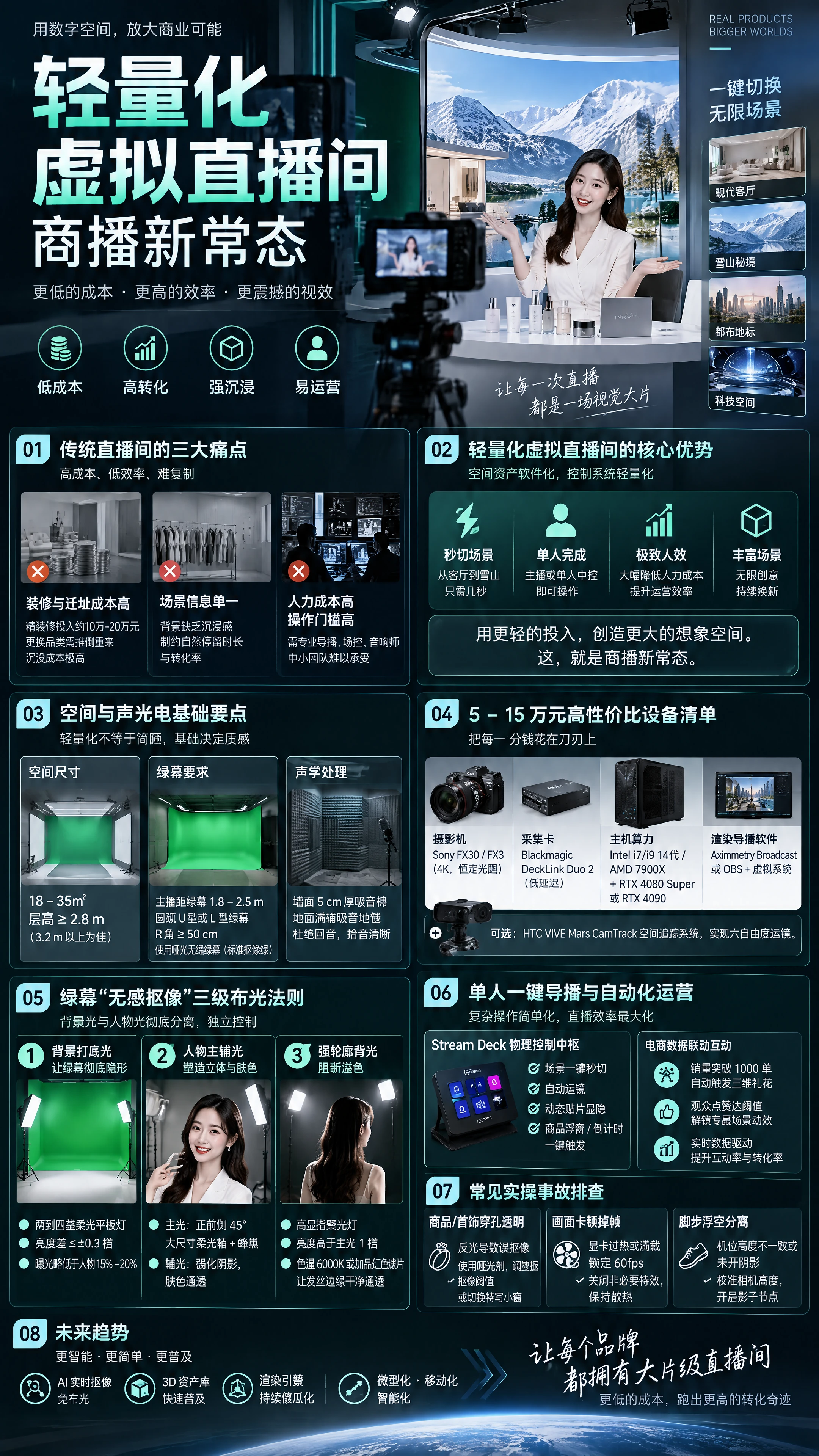
The first is the high cost of physical space renovation and relocation. A fully decorated high-end digital or beauty live studio typically requires 100,000 to 200,000 RMB in hard and soft furnishing investments. Once the product category changes or the livestream strategy adjusts, all decor must be torn down and redone; if the lease term changes, sunk costs are extremely high.
The second is the extremely limited information-carrying capacity of the scene. When the host is explaining down jackets, the background is a static white wall; when explaining sunscreen, the background is still shelving—the visuals lack immersion and emotional arousal, directly constraining the natural dwell time and conversion rate of the live studio.
The third is the high labor cost and operational threshold. Multi-camera switching, overlay graphics, and background adjustments typically require professional directors, floor managers, and audio engineers—and small to mid-sized teams simply cannot afford such bloated staffing.
The core logic of the lightweight virtual live studio is “spatial assets software-ized, control systems lightweight-ized.” Through a single green screen paired with a real-time rendering compositing software (such as Aximmetry SE/DE or a customized commercial virtual system), combined with a macro control keyboard, you can switch from a Nordic modern living room to the Alps snow mountains in seconds, and have the host or a single operator complete the entire livestream's audiovisual scheduling—maximizing operational efficiency.
II. Key Points for Basic Space, Sound, Lighting, and Electrical Renovation
Lightweight does not mean rudimentary—the sound, lighting, and electrical foundation of the live studio directly determines the production quality.
- Space Dimensions and Layout Planning The ideal net area for a lightweight live studio is recommended to be between 18 and 35 square meters, with a ceiling height of no less than 2.8 meters (3.2 meters or above is preferable). • Green screen depth: The host's standing position must maintain a physical distance of at least 1.8 to 2.5 meters from the green screen behind. This is the iron rule for avoiding green screen reflection contaminating skin and hair. • Camera position spacing: The camera should typically be 2.5 to 3.5 meters from the host, leaving sufficient room for optical focal length selection and avoiding severe edge distortion caused by ultra-wide-angle lenses.
- Green Screen Material and Form Selection Never use highly reflective velvet cloth or cheap synthetic fabric that wrinkles easily. • Recommended solution: Use matte seamless green screen floor vinyl or high-density thickened diffuse-reflection green screen cloth; the color code must be standard pure chroma key green. • Spatial form: It is recommended to build a curved-corner U-shaped or L-shaped green screen, with wall corners made into arc seamless transitions (R-angle no less than 50 cm), which eliminates right-angle wall shadows and provides the host with greater left-right movement space.
- Basic Acoustics and Sound Absorption Virtual live studios, due to their small space and multiple reflective wall surfaces, are highly prone to mid-to-high frequency sound reverberation. Walls should be extensively covered with 5 cm thick flame-retardant high-density polyester fiber acoustic panels, and the floor fully covered with sound-absorbing carpet, ensuring the host's audio pickup is clean and clear, avoiding the audience hearing hollow, harsh room echo on their mobile devices.
III. Cost-Effective Software and Hardware Selection List for 50,000 to 150,000 RMB
The essence of the lightweight solution is spending every penny where it counts. Below are standard configurations recommended after extensive commercial validation:
- Video Capture and Core Workstation • Camera system: Recommend mirrorless or professional cameras supporting 4K clear output with constant-aperture lenses (such as Sony FX30 / FX3 or Panasonic BGH1). Pair with 18-50mm or 24-70mm cinema-grade zoom lenses to ensure sharp resolution. • Capture card: Use broadcast-grade low-latency SDI/HDMI capture cards (such as Blackmagic DeckLink Duo 2 or Quad HDMI Recorder), ensuring multi-camera capture latency is controlled within 2 frames. • Host computing power: CPU: Intel i7/i9 14th Gen or AMD 7900X; GPU is the core lifeline—recommend NVIDIA RTX 4080 Super 16GB or RTX 4090 24GB. Sufficient VRAM ensures real-time rendering of 4K scenes and smooth streaming output, eliminating frame drops and crashes.
- Core Rendering and Directing Software • Professional advanced: Aximmetry Broadcast edition. Comes with a powerful dual-engine and top-tier keyer, capable of handling complex UE5 scene interactions, multi-camera movements, ground reflections, and shadow calculations—suitable for brand self-broadcasting that pursues ultimate visual quality. • Quick commercial: If deep tracking is not needed, a lightweight commercial virtual directing system paired with OBS Studio can be used, utilizing built-in chroma key plugins and virtual camera streaming.
- Spatial Tracking Equipment (Optional) If camera push-pull-pan-tilt movements and large-range tracking shots are needed, an HTC VIVE Mars CamTrack system can be added, paired with lens zoom and focus encoders, achieving industrial-grade camera six-degree-of-freedom spatial positioning at extremely low cost. If fixed-position or PTZ camera positions are the primary setup, the tracking budget can be omitted, and virtual camera preset movements can be used instead.
IV. The Three-Tier Lighting Rule for “Seamless Keying” on Green Screen
Many teams experience black, green, or rough keying edges—90% of the problem lies in lighting. The first rule of lighting is: background light and subject light must be completely separated and independently controlled.
Tier 1: Background base light (making the green screen completely invisible) Use two to four wide-angle strip soft panel lights, cross-firing at 45 degrees from left and right onto the green screen wall. • Core standard: Turn on the monitor's zebra pattern or waveform monitor—the brightness difference across any area of the green screen surface must not exceed ±0.3 stops of exposure; the waveform must be pulled into a flat, straight horizontal line. • Brightness control: The green screen background exposure value should be slightly lower than the host's facial exposure by about half a stop (approximately 15% to 20% lower). If the background is lit too brightly, the reflected green light will act like a powerful floodlight and devour the host's silhouette.
Tier 2: Subject modeling key and fill lights (sculpting dimension and skin tone) • Key light: Positioned at a 45-degree angle to the front-side of the host, using a large deep parabolic softbox with honeycomb grid, providing soft but directionally clear facial modeling light, ensuring clean eye whites and rosy skin tone. • Fill light: Placed on the other side, softening facial shadow contrast, maintaining the approachable and translucent feel required for e-commerce livestreaming.
Tier 3: Strong rim backlight (a physical firewall against color spill) Hang one to two high-CRI spotlights (with snoots or barn doors) at an angle above and behind the host. • Mechanism: Project a hard rim light onto the host's hair, shoulders, and arms at 1 stop brighter than the key light. • Color grading technique: Slightly raise the color temperature of the rim light (e.g., 6000K cool white), or use a Magenta gel for complementary counteraction, physically neutralizing and canceling any faint green light that may bounce onto the hair—making every strand of hair at the edges distinct and achieving razor-clean transparent keying.
V. Single-Operator One-Click Directing and Automated Operations in Practice
To achieve “a single person completing an entire major promotion livestream,” tedious scene switching, overlay control, and camera movement triggers must be bound to a physical macro controller.
- Physical Control Hub: Deep Stream Deck Integration Through Elgato Stream Deck paired with network communication plugins (OSC / HTTP / MIDI), common commands are solidified into physical illuminated buttons: • One-click scene switching: Button 1 switches to “opening wide shot,” Button 2 switches to “product close-up 3D display stand,” Button 3 switches to “promotional campaign large screen background.” • Automated camera movements: Preset virtual camera ease-in/ease-out movement trajectories (smooth push from wide shot to medium close-up), triggered with a single button press for stable camera movement—completely eliminating the need for traditional jibs and expensive mechanical rails. • Dynamic asset show/hide: One-click pop-up of the 3D selling-point floating window for the product currently being explained, limited-time coupon effects, and inventory countdown labels.
- E-Commerce Data-Driven 3D Spatial Interaction Advanced lightweight virtual live studios are no longer just static backgrounds but interactive stages linked in real time with platform data: • Sales milestone triggers: Through open APIs, capture real-time sales in the live studio—when orders exceed 1,000, the system automatically launches 3D confetti particles from the virtual scene ceiling with exclusive sound effects. • Fan interaction and tipping linkage: When viewer likes reach a specified threshold, the background large screen automatically unlocks exclusive scene animations, greatly stimulating interaction rates and algorithmic weight recommendations for the live studio.
VI. Common Operational Troubleshooting Manual for Commercial Virtual Livestreaming
- Host's fingers, transparent packaging, or reflective jewelry showing see-through holes • Root cause analysis: Reflections on the product or jewelry surface reflect the green screen light from the front, causing the keyer to misjudge it as green background and punch it out. • Solution: Wipe the foreground metal and plastic packaging with matting agent; fine-tune the Core Matte threshold in the Advanced Keyer node; or temporarily switch the directing console to a close-up physical product picture-in-picture window.
- Stream occasionally stuttering and dropping frames after half an hour of live streaming • Root cause analysis: GPU overheating causing core downclocking, or the virtual engine not limiting maximum frame rate, causing the GPU to run at full load (99%) long-term with VRAM overflow. • Solution: Force-lock the maximum frame rate to 60fps (or 50fps) in the virtual engine console; disable unnecessary dynamic fluid effects in the engine; regularly clean dust from the chassis and ensure the directing room is equipped with constant-temperature air conditioning.
- Host's footsteps floating and separating from the virtual ground when walking • Root cause analysis: Virtual camera height inconsistent with the physical camera mounting height, or virtual-physical ground shadow casting not enabled. • Solution: Measure the vertical distance from the physical tripod to the ground and precisely input it into the virtual camera's Z-axis height parameter; enable the Shadow Caster node in the software to overlay the host's real footstep shadows onto the virtual ground material, giving the subject a sense of physical weight.
VII. Summary and Future Commercialization Path
The essence of the lightweight virtual live studio is an efficiency revolution that uses “digital assets and high-density information” to dimensionally strike down “traditional shelf livestreaming.” It gives small and mid-sized brands the possibility of rivaling major corporations' visual effects quality within a highly controllable cost boundary.
With the continued simplification of lightweight rendering engines, the lighting-free evolution of AI real-time keying technology, and the rapid popularization of 3D asset libraries, future virtual studios will further evolve toward miniaturization, mobilization, and intelligence. For today's digital commercial teams, whoever masters this standardized lightweight setup and automated directing paradigm first will be able to achieve higher conversion miracles with lower labor costs in the increasingly detail-obsessed second half of content e-commerce.

 简体中文
 English