
Over the past two years, from New Year's Eve concerts and tech product launches to e-commerce mega-sales by top-tier brands, real hosts interacting on stage with 3D virtual digital humans has become a standard crowd-pleasing format for livestreams. However, many teams stumble badly the first time they try it in production: on the monitor, the virtual human walks as if gliding on ice; when attempting a hug, the hands plunge straight through the model's body; the real host and virtual human appear to be conversing, yet their eyes each gaze into the void, like two blind strangers awkwardly making small talk; worse still, a tiny deep breath from the motion capture performer causes the virtual idol's cheeks to twitch and deform. Real person–virtual human on-stage interaction is by no means as simple as pasting a green-screen figure into a virtual scene—it is a systems engineering challenge encompassing spatial alignment, skeletal retargeting, low-latency network routing, and physical penetration prevention. This article will guide you through thoroughly conquering every technical pitfall in on-stage interaction.
I. The Four Major Physical Immersion-Breaking Pitfalls of On-Stage Interaction
Before formally building the system, we must first identify exactly what destroys the immersion of human-machine interaction:
The first is “vacuum drift of gaze targets.” This is the most fatal yet most easily overlooked flaw. The real host faces empty air in a green screen or studio environment; without precise physical reference coordinates, their gaze will land either too high or too low. Meanwhile, if the virtual human's eyes are locked onto a fixed camera lens, a strong gaze misalignment occurs when the two appear in the same frame. The audience's brain has millisecond-level sensitivity to “eye contact,” and the moment the gaze is off, immersion shatters instantly.
The second is “ghostly penetration of spatial contact.” When the real person tries to pat the virtual human on the shoulder, or the virtual human receives a product from the real person's hand, digital assets lacking physical collision constraints will inevitably experience mesh penetration. Fingers sinking into skin, arms passing through clothing—such non-physical, uncanny imagery immediately destroys the premium feel of the entire livestream.
The third is “foot sliding and nervous micro-twitching of the mocap skeleton.” During extended livestreams, magnetic interference on the mocap suit, Bluetooth packet loss, or accumulated sensor drift can cause the virtual human's feet to slide off the ground, with a previously stable stance beginning to drift unnaturally forward and backward. Additionally, faint physiological tremors in the mocap performer's fingers or face get amplified onto the 3D model without filtering, causing the virtual human's facial muscles to display bizarre twitching.
The fourth is “temporal-spatial misalignment and feedback howling in the audio-video chain.” The live host's microphone, the mocap performer's microphone, the video capture card, the mocap network data packets, and the render engine output each have independent latency chains. If the difference exceeds two frames, the two people's conversation will exhibit obvious interruptions, missed comedic timing, or the awkward situation of sound occurring before the corresponding action. If the audio foldback monitoring is not physically isolated, the microphones in the mocap booth and on the main stage will also trigger piercing audio howling.
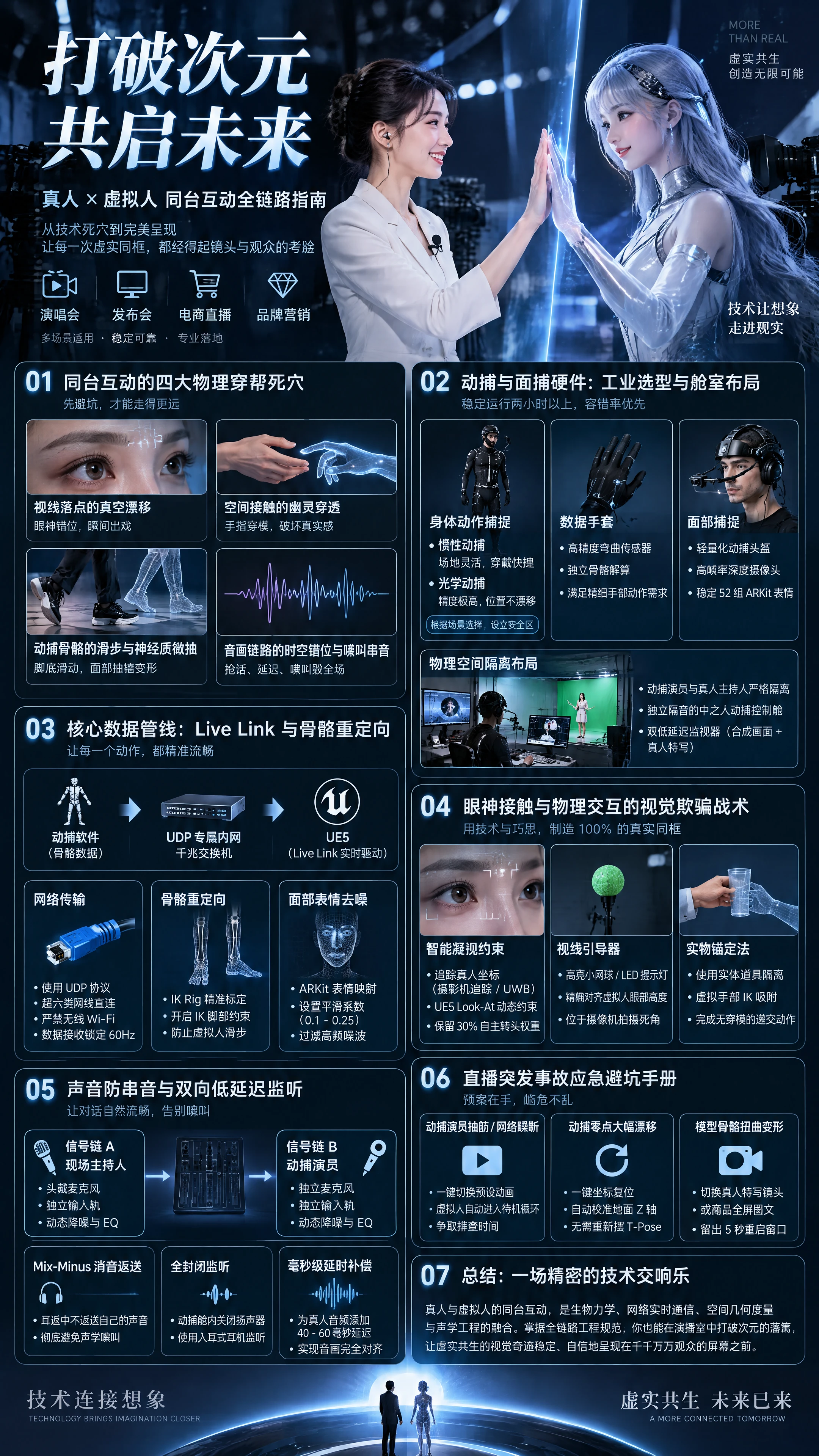
II. Motion Capture and Facial Capture Hardware: Industrial Selection and Physical Booth Layout
To ensure reliable performance through two or more hours of high-intensity continuous livestreaming, hardware selection must follow the principle of “fault tolerance first.”
- Body Motion Capture: Inertial vs. Optical Decision • Inertial mocap solution: Suitable for small-to-medium studios or commercial broadcast environments. Advantages include immunity to truss and lighting occlusion, quick donning, and minimal site restrictions. Disadvantages include susceptibility to magnetic interference from large steel beams and underfloor heating high-voltage equipment in the studio, and tendency toward heading drift during extended livestreams. • Optical mocap solution: Suitable for large product launches or stages demanding extreme precision. Advantages include absolute spatial origin lock, absolutely no positional drift, and extremely solid foot contact with the ground. Disadvantages include the need to ensure infrared camera line-of-sight is not blocked by on-site camera cranes or lighting rigs. • Practical pitfall-avoidance advice: If using inertial mocap, be sure to establish an independent mocap safe zone in the studio away from high-voltage panels and large metal props, and mark a one-touch calibration point (T-Pose reset zone) on the floor.
- Fine Finger Movement: Data Gloves Are the Bottom Line Do not attempt to rely on the simple gesture estimation built into the headset/body unit. High-frequency interactions such as picking up props, making finger hearts, and pointing must rely on data gloves with built-in high-precision bend sensors and IMUs. The gloves must support independent skeletal solving to prevent interpenetration when the thumb and index finger pinch together.
- Facial Micro-Expressions: Industrial-Grade Helmet-Based Capture Many teams, for convenience, simply mount a phone on a stand at a distance to film the performer's face—this leads to tracking loss when the performer needs to turn their head or walk around. • Professional standard: A lightweight mocap helmet must be used, with a high-frame-rate depth camera (or a dedicated iPhone depth-sensing lens) firmly locked 15 cm in front of the performer's face. No matter how much the performer runs, jumps, or shakes their head, the relative distance between the camera and facial features remains constant, ensuring smooth and continuous driving of the 52 ARKit BlendShapes.
- Physical Space Isolation Layout It is strictly forbidden to place the mocap performer and the real host in the same open acoustic space! An independent “performer mocap control booth” must be established, with professional soundproofing and acoustic treatment inside, while the real host performs on the main stage outside. Two low-latency, low-reflection monitors must be placed in front of the performer: one displaying the final composited feed from the live camera, and the other displaying a real-time close-up camera feed of the real host, allowing the performer to instantly see every micro-movement and facial emotion of the real person.
III. Core Data Pipeline: Live Link and Skeletal Retargeting Optimization
From the mocap performer's body movements to the character's skeletal motion in Unreal Engine 5, the intermediate data flow channel must be extremely streamlined.
- Live Link Ultra-Fast Network Transmission Topology The skeletal rotation and displacement data solved by the mocap software must be broadcast to UE5 via UDP protocol over a dedicated gigabit switch on a physical intranet. • Strictly forbidden to use wireless Wi-Fi: The mocap host and render host must be directly connected using industrial-grade Cat6a Ethernet cable, eliminating packet loss and frame skipping caused by wireless signal interference from audience mobile phone hotspots. • Enable Live Link and Animation Blueprint in UE5, lock the reception frequency to 60Hz, and maintain integer-multiple alignment with the project's overall frame rate.
- Skeletal Retargeting and Anti-Sliding Lockdown The mocap performer's height proportions cannot possibly match the virtual character's model skeleton exactly. • Configure skeletal alignment: Carefully calibrate the binding poses of both in UE5's IK Rig, with particular attention to spine rotation mapping and scapula linkage. • Enable Inverse Kinematics (IK foot constraints): This is the secret weapon for completely eliminating foot sliding. Add a Foot Placement node in the Animation Blueprint to forcibly detect the virtual character's ankle coordinates. When the skeleton presses down to the ground height threshold, automatically lock the sole's world coordinates and rotation angle, and only release the lock when the leg-lift threshold is triggered. This way, even if the performer's feet shift slightly, the virtual human's soles remain firmly suctioned to the virtual ground.
- ARKit Facial Expression Denoising and Smoothing Slight lip twitches or blink jitters when the performer speaks require dynamic filtering. In the Live Link facial mapping node, set slight smoothing coefficients for key channels such as mouth opening and blinking (recommended between 0.1 and 0.25), preserving the vividness of micro-expressions while filtering out high-frequency physiological noise.
IV. Visual Deception Tactics for Eye Contact and Physical Interaction
The key to making on-stage interaction look 100% realistic lies in how to fake eye contact and physical collision with minimal manual intervention:
- Intelligent Look-At Constraint If relying entirely on the performer's head orientation, it is very difficult for the virtual human's gaze to precisely land on the real person's pupils. • Technical solution: Track the real host's physical spatial coordinates in the studio (via camera trackers or UWB positioning tags bound to the real person's body). • Engine solving: Add Aim Offset and Look-At nodes in the UE5 Animation Blueprint to dynamically constrain the virtual character's eyeball bones and cervical spine bones with subtle rotation weights, pointing toward the real host's head coordinates. • Realism fine-tuning: Never mechanically lock 100%! You must retain 30% of the mocap performer's autonomous head-turn weight, allowing the virtual character to occasionally blink naturally, look around, and ponder, then re-focus their gaze on the real person's face—this relaxed eye contact is what matches human physiological instinct.
- Physical Air Coordinate Points and Gaze Guides The real host can easily look lost staring at empty air on set. • Simple practical solution: At the edge of the green screen stage, in an area that is a dead angle for the camera, set up a high-brightness green tennis ball (or a miniature red LED indicator light) on a high-precision adjustable stand, with its physical height precisely aligned to the virtual human's preset eye height. When the script calls for the two to converse, the real host simply looks directly at this small red dot, and in the final composited monitor, both people's gazes will align perfectly, down to the millimeter.
- Physical Contact Occlusion and Close-Range Interaction Anti-Penetration When the two need to shake hands or pass a product, the most reliable industrial-grade approach is the physical anchor method: Create a matte prop in the real studio that is exactly the same size as the virtual prop (for example, a plastic sword with tracking points or a physical water cup). The real person grips the physical end of the prop, while the virtual character's hand is forcibly attached to the 3D model endpoint of the prop via IK constraints. By using the physical prop as a spatial isolation medium, the two need not make direct physical contact, yet can complete an extremely impressive seamless handoff.
V. Audio Anti-Crosstalk and Bidirectional Low-Latency Monitoring Topology
Many technical teams debug their visuals flawlessly, only to have the broadcast completely destroyed by piercing howling the moment it goes live. An industrial-grade audio matrix isolation system must be built:
- Dual Independent Mix Buses • Signal Chain A (live host): Wearing a top-tier omnidirectional miniature flesh-colored headset microphone, with the signal sent directly to the host input channel on the digital mixing console; • Signal Chain B (mocap performer): Wearing a dedicated microphone inside the mocap soundproof booth, with the signal sent separately to the virtual human input channel on the digital mixing console. Both audio paths undergo independent dynamic noise reduction, EQ, and reverb compensation.
- Mix-Minus Monitoring That Absolutely Eliminates Howling • In the real host's wireless in-ear monitors, only the live director's cues, show background music, and the mocap performer's voice may be heard; the host's own voice must never be fed back into their in-ears; • In the mocap performer's monitoring headphones, only the director's cues, background music, and the real host's voice may be heard; their own voice must never be fed back. • Physical-level isolation: Speakers inside the mocap booth are completely turned off, and all interaction monitoring runs 100% through fully enclosed in-ear headphones, completely eliminating acoustic howling caused by sound oscillating back and forth between microphones and speakers.
- Millisecond-Level Audio-Video Delay Compensation Because mocap data goes through solving, network streaming, and UE5 Animation Blueprint rendering, it is typically 2 to 3 frames (approximately 40 to 60 milliseconds) behind the pure video signal captured by the live camera. • Solution: On the master control digital mixing console, artificially apply a delay queue of the corresponding millisecond count to the real host's audio signal, so that the real person's voice, the real person's lip movements, the virtual human's actions, and the virtual human's speech are all perfectly aligned on the same absolute time slice.
VI. Live Broadcast Emergency Response Pitfall-Avoidance Manual
In large-scale livestreams with tens of millions of views, a full set of airbags must be set up for the virtual human to prevent disasters:
- Mocap Performer Suddenly Cramps or Network Drops • Emergency plan: Set up a one-touch preset animation switch on the control desk. Once the mocap signal is interrupted, the director immediately presses the button, and the virtual human instantly detaches from mocap data driving, seamlessly and smoothly transitioning to a pre-recorded 3D idle loop animation (such as hands clasped in front, smiling and naturally nodding and breathing), buying time to troubleshoot the network.
- Mocap Zero Point Drifts Significantly, Virtual Human Sinks Underground • Emergency plan: Bind a one-touch coordinate reset hotkey in the Animation Blueprint. The technician simply presses one key, and the system automatically recalibrates the ground Z-axis zero point based on the current foot contact point, without requiring the performer to re-enter T-Pose and interrupt the livestream.
- Virtual Human Model Suddenly Shows Skeletal Distortion and Deformation • Emergency plan: The director's console immediately cuts the main feed seamlessly to a medium close-up single shot of the real host on site, or cuts to a full-screen product graphic panel, giving the backstage technical team a five-second window for a hot restart and reconnection.
VII. Conclusion
Real person–virtual human on-stage interaction is by no means a solo performance of any single technology, but a precision symphony integrating biomechanics, real-time network communication, spatial geometry measurement, and acoustic engineering. It tests not only how realistic the 3D assets are, but also the rigor and tolerance of the entire technical chain when facing the real physical world.
When cold digital code is given precise physical anchor points, when the virtual character's gaze has a real soul to focus on, the vitality of virtual-real fusion truly begins to bloom. Master this rock-solid full-chain engineering specification, and you can break through the barriers of dimensions within the confines of a studio, presenting the visual miracle of virtual-real coexistence stably and confidently on the screens of millions of viewers.

 简体中文
 English