
For the past three decades, the underlying logic of computer graphics and virtual production has been built on the skeleton of polygon meshes: no matter how exquisite a 3D asset is, it is essentially a hollow shell composed of triangular faces wrapped with textures. To recreate a real ruined castle or a pine forest in a virtual studio, a production crew would need LiDAR scanning, followed by weeks of manual retopology and decimation, UV unwrapping, texture baking, and hand-tuned subsurface scattering; even then, when faced with wind-swaying fine grass blades, hair edges, and the complex bidirectional reflectance of transparent puddles, the traditional polygon pipeline still easily falls short and reveals seams. The neural radiance field (NeRF) and 3D Gaussian splatting (3DGS) technologies that have exploded in recent years have completely overturned the underlying physical philosophy of 3D reconstruction. With just a set of high-overlap photos captured by a DSLR or drone, the light field information of a real physical space can be converted within hours into a digital twin that can be freely roamed in real time from any angle. However, how do you truly stitch this cutting-edge neural radiance field asset into a rigorous virtual production rendering pipeline to achieve real-time camera movement, precise shadows, and secondary relighting? This article will fully unveil this dimensionality-reducing cutting-edge practical workflow.
I. Paradigm Shift: Why Gaussian Splatting Is the Wall-Breaker of the Polygon Pipeline
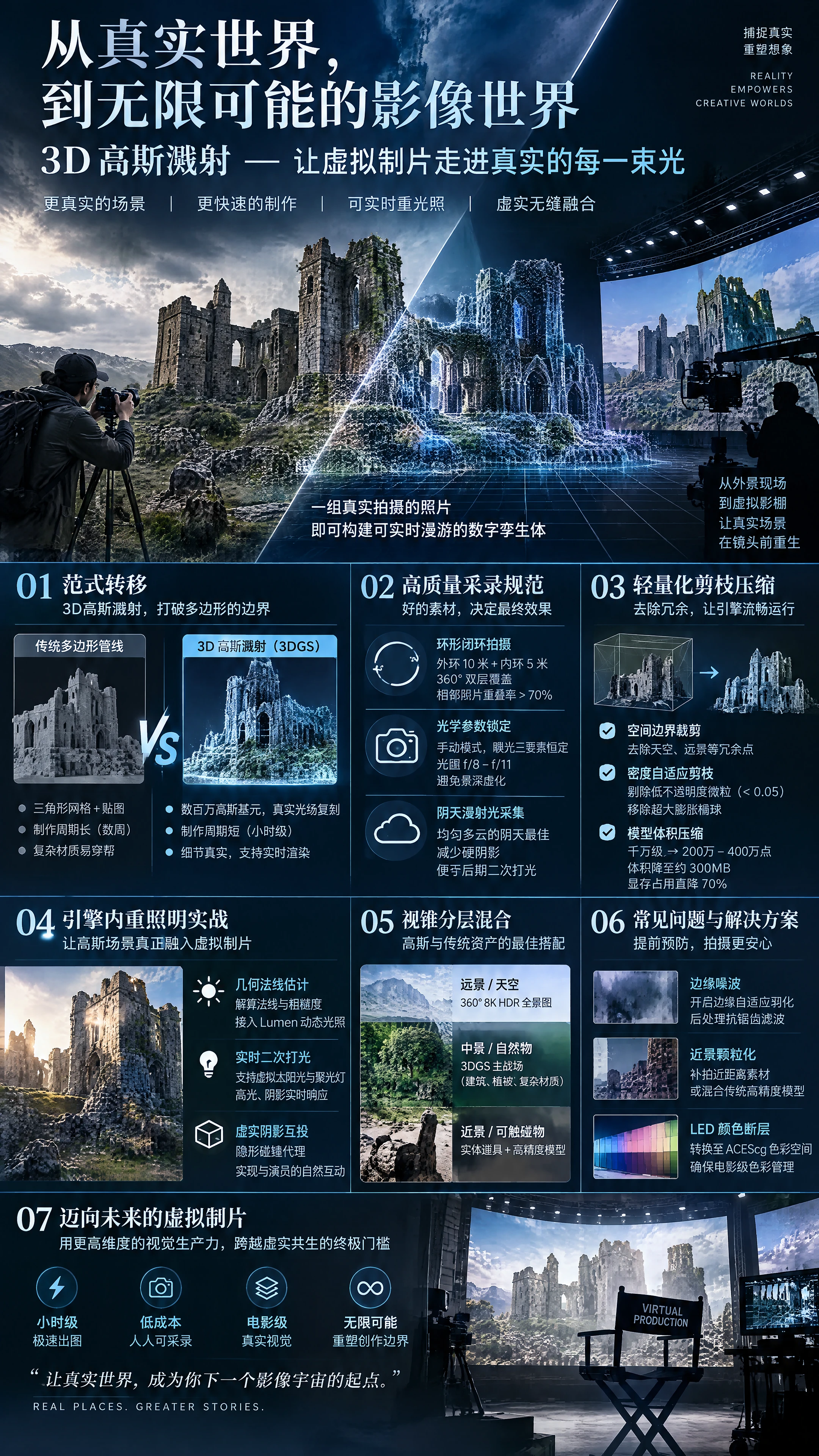
In traditional virtual production pipelines, asset production cycles are often the biggest bottleneck that locks down project schedules. To understand the disruptive nature of 3D Gaussian splatting, one must see clearly its essential divergence from traditional polygon meshes:
First is “moving from geometric approximation to true light field replication.” Traditional polygon models “build the skeleton first, then apply the skin.” Due to limited polygon compute, complex non-rigid geometry in reality (such as fine weeping willows swaying in the wind, translucent mist, and fuzzy moss) is crudely simplified, ultimately exposing flat triangular facet edges in extreme close-up shots. 3D Gaussian splatting, by contrast, completely abandons triangular meshes and fills 3D space with millions or even tens of millions of micro Gaussian primitives carrying covariance matrices (oriented ellipsoid forms), opacity, and third-order spherical harmonic colors. This means what it stores is not mere geometric shape, but “the full radiant energy of light passing through this space from every angle,” naturally including view-dependent anisotropic specular highlights, caustics, and soft translucent edges.
Second is “compressing production time from months to hours.” In traditional photogrammetry workflows, after dense point clouds are computed from captured photos, painful manual work such as mesh reconstruction, noise cleanup, and texture baking is required; once the director requests a scene change on set, there is simply no way to respond quickly. With the 3DGS approach, a set of 500 high-quality captured photos fed into a GPU training cluster typically finishes training in just 20 to 40 minutes, and by that afternoon the real forest location can be brought onto the studio's LED volume.
Third is “a leap in real-time rasterization speed.” Although early NeRF was visually realistic, each pixel required hundreds of dense volumetric samples along the view ray through a deep neural network, often taking seconds or even minutes per frame—completely unable to meet the hard real-time requirement of 50 frames per second in virtual production. 3D Gaussian splatting innovatively adopts a tile-based parallel rasterization sorting algorithm, easily achieving astonishing frame rates of over 100fps at 4K resolution on a single RTX 4090, truly opening the door to industrial-grade real-time production for the first time.
II. The Source Determines Success: Location Capture Standards for Gaussian Radiance Fields
A high-quality 3DGS model is by no means something you can get by casually shooting with a phone. If the original image capture has motion blur or parallax discontinuities, the trained Gaussian primitives will produce severe needle-like noise resembling “floating mosquitoes.”
- Closed-Loop Circular and Dual-Layer Cross Trajectories The subject must be captured following rigorous spatial geometric coverage: • Dual-layer coverage with a wide-angle outer ring and a close-range inner ring: With the target building or natural landscape as the core, perform a 360-degree circular orbit shoot at an outer radius of 10 meters with the camera lens slightly tilted up and down; then perform a second, closer orbit at a radius of 5 meters to capture micro textures. • Minimum overlap between adjacent frames: The overlap area between two adjacent photos must be strictly greater than 70%, and the pitch angle change between consecutive shots must not exceed 15 degrees. Once the overlap rate is insufficient, the structure-from-motion algorithm cannot solve for accurate sparse feature point matching, causing local scene tearing and collapse.
- The Ironclad Lockdown Rule for Optical Parameters When capturing photos, all optical parameters of the DSLR or cinema camera must be switched to fully manual mode and completely locked down: • The three exposure elements and white balance must be absolutely constant: Never enable auto ISO, auto shutter, or auto white balance! If sunlight is blocked by clouds during the orbit shoot, causing uneven brightness in captured images, the spherical harmonics will learn self-contradictory photometric information at the same physical point, causing severe flickering when the model is viewed from different angles. • Avoid the deep depth of field trap: Never use an ultra-large aperture for aesthetic beauty, as large areas of optical bokeh in the background will be misjudged by the algorithm as semi-transparent volumetric noise. The aperture must be stopped down to f/8 to f/11, using a high-resolution tripod with slow exposure to ensure the image is within a razor-sharp hyperfocal range from the extreme foreground to the extreme background.
- Overcast Diffused Light Golden Capture Window The best time to capture a real scene is not a clear sunny noon, but a uniformly cloudy overcast day. Because strong direct sunlight on a sunny day casts extremely deep, hard shadows on the ground and wall corners, and these shadows will be baked firmly into the Gaussian model's spherical harmonic colors. Once this shadowed model is imported into the studio, when the director tries to adjust the virtual scene's sun to the opposite direction, the existing shadows will produce severe physical conflicts with the new light source; assets under overcast diffused light, however, are nearly shadow-free base colors, leaving maximum freedom for later secondary relighting.
III. Advanced Engineering: Lightweight Pruning and VRAM Compression of Gaussian Assets
The native 3DGS file directly output from training typically contains 5 to 15 million Gaussian points, generating PLY files as large as several gigabytes; dropping it directly into Unreal Engine 5 will instantly blow out 24GB of VRAM, causing a cliff-edge frame rate crash. Industrial-grade pruning and compression must be performed before importing into the engine:
- Spatial Boundary Cropping Raw training often solves the distant horizon, floating clouds in the sky, and unwanted capture waste all together. In editing software, pull out a 3D bounding box tightly fitting the effective capture subject and cut away waste point clouds outside the frustum range with one click, typically directly removing 40% of redundant points.
- Density-Adaptive Pruning Set strict culling thresholds in the algorithm pipeline: • Cull near-transparent particles: Thoroughly remove extremely transparent particles with opacity below 0.05; these tiny points that are almost invisible to the naked eye only waste rasterization sorting compute; • Cull oversized inflated ellipsoids: Forcefully shatter or strip giant Gaussian primitives whose long-axis size exceeds a threshold, eliminating blurry color-block artifacts when the camera approaches; • After multiple rounds of adaptive pruning, a ten-million-level point cloud can be safely compressed to 2 to 4 million points, with model size compressed to around 300MB, VRAM usage dropping by 70%, thoroughly smoothing out frame drop risks.
IV. In-Engine Stitching: Practical Secondary Relighting of Gaussian Scenes in Unreal Engine 5
For a long time, the biggest stumbling block preventing 3DGS from entering commercial virtual production has been “inability to relight”—because traditional Gaussian models only record the fixed lighting at capture time, and after being placed into UE5 they cannot receive illumination from the engine's internal virtual sunlight and spotlights, let alone cast dynamic shadows. To blend Gaussian backgrounds seamlessly with the physical lighting on the studio floor, a next-generation relighting pipeline must be adopted:
- Gaussian Material Shading Based on Geometric Normal Estimation With the help of advanced Gaussian relighting algorithm plugins, the system reverse-solves each Gaussian particle's local geometric surface normal vector and approximate roughness during the preprocessing stage: • Material property decoupling: Decompose the Gaussian model's radiance color into a base diffuse albedo layer and an ambient lighting layer; • Connect to engine lighting computation: In Unreal Engine, rewrite the Gaussian pixel shader so that each Gaussian point can participate in real time in the diffuse and specular reflection computation of Lumen dynamic global illumination and directional lights. When we drag a moving searchlight across the castle Gaussian model in the engine, the castle walls can present real-time specular highlight movement and backlit dark areas consistent with physical falloff.
- Virtual-Real Hybrid Shadow Casting The key to solving “virtual scenes not connecting with real scenes” lies in the ground contact and shadows: • Simple invisible collision proxy: For the core ground and key load-bearing walls of the Gaussian scene, quickly auto-generate a set of extremely low-polygon light-blocking proxy models and set their material to “shadow casting only”; • Mutual shadow casting and receiving: When actors walk in front of the green screen, the shadows produced by physical studio lights are projected through the keying alpha onto the invisible proxies in the engine, naturally falling onto the Gaussian ruin ground; conversely, Gaussian buildings can also block the virtual sun, casting realistic dynamic shadows seamlessly onto the actors, breaking the visual dimensional barrier.
V. Frustum-Layered Hybridization: The High-Low Pairing Tactic of 3DGS and Traditional Assets
In actual cinematic large-scale scenes, the smartest production strategy is by no means full Gaussianization, but “frustum layering, virtual-real mixed compilation”:
- Mid-ground and Complex Natural Objects: The Main Battleground of 3DGS Leave the mid-ground areas primarily captured by the camera—such as moss-covered rocky shores, intricately carved medieval broken walls, and dense low shrubs—entirely to 3D Gaussian splatting. These areas have extremely high polygon modeling costs and easily look fake, making them the perfect arena for Gaussian volumetric luster and micro roughness to shine.
- Ultra-Distant Scenery and Sky: Lightweight Panorama Takeover For distant mountains and sky ten kilometers away, resolutely do not waste Gaussian point cloud compute. Outside the effective Gaussian scene boundary, directly stitch a 360-degree 8K HDR panoramic dynamic sky sphere to provide grand, vast, seamless distant wrapping.
- Objects Directly Touched by Characters: Seamless Interlocking with Physical Props Tables and chairs that actors need to touch with their hands, and the core foreground floor they need to step on, must be built with physical props. • Spatial coincidence alignment: During the capture stage, place these physical props directly in the real scene and capture them together to generate Gaussian assets; during studio set construction, use tracking positioners to absolutely coincide the physical props' coordinates with the Gaussian props in the 3D engine, then locally crop and hide the corresponding Gaussians in the engine. This way, the moment the actor's hand grips the wooden handle in reality, the frame edges fit seamlessly, thoroughly eradicating the century-old problem of model intersection and clipping.
VI. On-Site High-Frequency Accident Troubleshooting and Pitfall Avoidance Guidelines
- When the camera moves significantly, a ring of white “hair-like debris” or colored noise appears at the frame edges • Root cause analysis: When the Gaussian point's viewing angle tilt reaches the extreme grazing angle, the covariance matrix projection solution produces numerical instability or sorting penetration. • Solution: In the engine's Gaussian rendering component settings, enable edge-adaptive feathering, and apply lightweight anti-aliasing temporal filtering in the post-process volume to softly filter out high-frequency sorting artifacts.
- When the camera rapidly approaches an object, the originally smooth surface suddenly bursts into large granular color blocks • Root cause analysis: Typical sampling resolution breakdown. This is because during location capture, the closest distance between the camera and the object was too large, resulting in insufficient local detail photo input for the close range, forcing the algorithm to use giant Gaussian particles for forced interpolation to fill the space. • Solution: Strictly follow close-range macro capture standards; if supplementary shooting is no longer possible, limit the camera's minimum movement distance range in the scene, or blend traditional high-precision micro-polygon materials at the object's extreme close-up range for local parallax occlusion.
- After importing the Gaussian scene, the LED screen shows severe flickering or color banding • Root cause analysis: The color data exported from the Gaussian model uses an un-gamma-corrected sRGB nonlinear color space, creating color compression and tearing against the ACEScg wide-gamut pipeline of the full virtual production workflow. • Solution: During the model import stage, use a conversion script to force-solve and remap the spherical harmonic color coefficients to the ACEScg scene-linear space, ensuring every pixel output to the LED screen sending card is within the standard cinematic color management coordinates.
VII. Conclusion
The arrival of 3D Gaussian splatting and neural rendering technology is by no means merely a technical iteration of rendering algorithms; it represents a fundamental reshaping of how the 3D world and the physical world are digitally fused. It shatters the previously lofty, multi-million-budget heavy-asset 3D modeling workflow into a democratized industrial revolution where anyone can capture and produce results at hour-level speed.
When the shimmer among lush foliage, the damp water stains on weathered ancient walls, and even the misty halos floating in the air can all be freely navigated and dynamically relit in the studio monitor with extremely low compute, only then has virtual production truly broken free from the physical shackles of polygon counts. Embrace neural rendering, master geometric pruning and hybrid relighting principles, and you will cross the ultimate threshold of virtual-real symbiosis with extremely high-dimensional visual productivity.

 简体中文
 English