In the field of virtual production and commercial live broadcasting, the most suffocating nightmare for a director is none other than: a million viewers are watching a product launch, and the rendering host suddenly blue-screens, or the GPU triggers driver protection due to overheating. For ordinary live streams, a few seconds of lag might just be a talking point, but in a brand event with tens of millions of impressions, those few seconds are a serious PR disaster. An excellent system architecture design never assumes the system will always be online; instead, it presupposes that it will crash at the most critical moment, and on that premise builds a disaster recovery system in which the audience notices nothing when a crash occurs. From hardware-level signal matrix switching to engine-level synchronized snapshot mirroring, this article will reveal how to install the “last airbag” for a virtual studio.
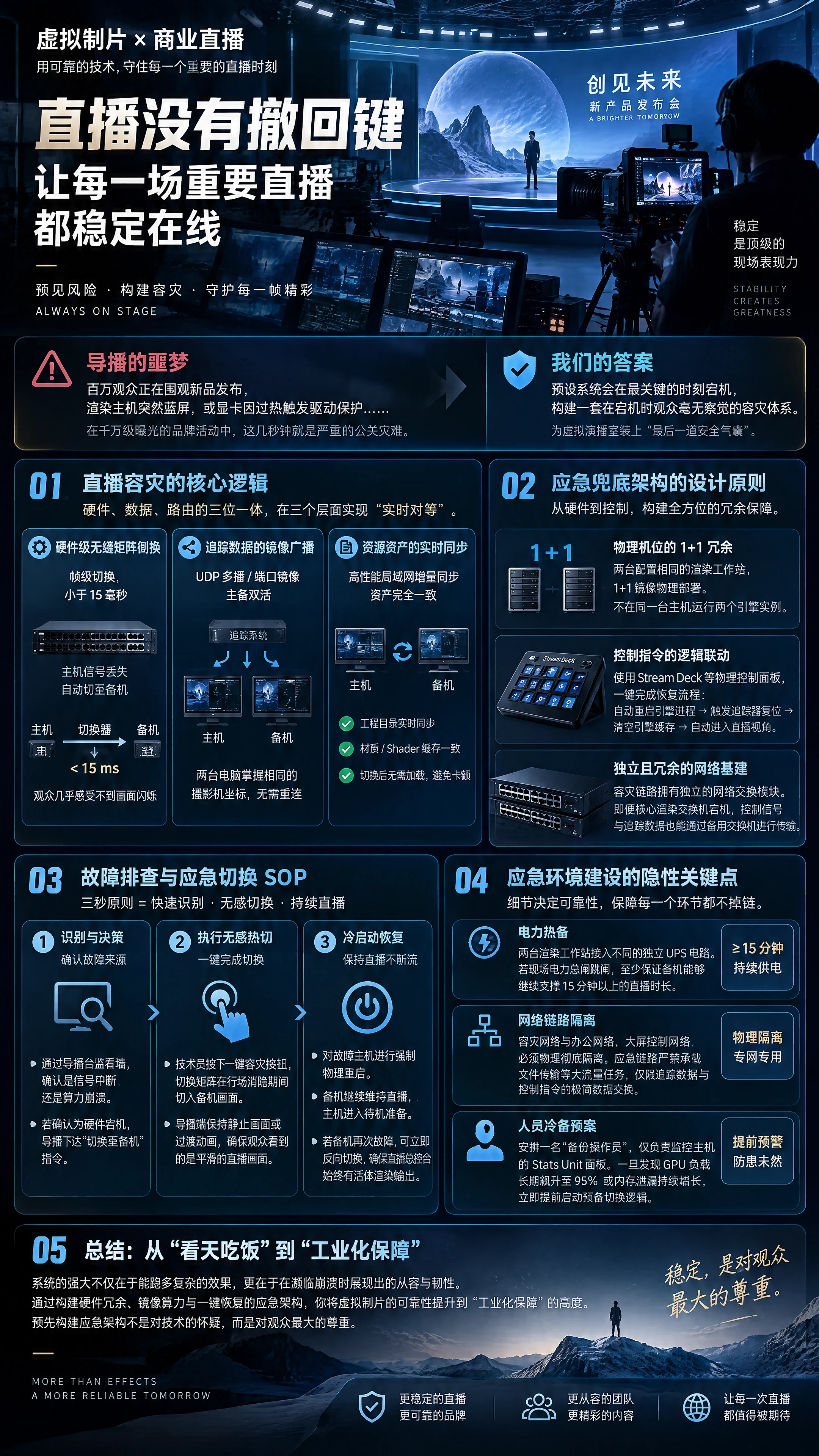
I. The Core Logic of Live Broadcast Disaster Recovery: The Trinity of Hardware, Data, and Routing
Emergency switching in a virtual studio is by no means as simple as manually restarting a computer; it must achieve “real-time equivalence” across three layers: hardware routing, rendering compute, and data flow.
- Hardware-Level Seamless Matrix Switching This is the last line of defense against crashes. The core video output link must never be connected directly to a streaming encoder; it must first be routed through a switcher or broadcast-grade matrix that supports “frame-accurate switching.” This device monitors the Master's SDI signal in real time. Once signal loss is detected, the device must be able to automatically switch the output source to the Slave during the horizontal and vertical blanking interval (less than 15 milliseconds). The audience won't even perceive a flicker in the image.
- Mirror Broadcasting of Tracking Data The UDP data packets sent by the tracking system (such as VIVE Mars / Mo-Sys) must be configured in Multicast mode, or copied in real time to both the primary and backup rendering workstations via switch port mirroring. This means the two computers are not in a “master-slave relationship” but in a “dual-active state.” Whichever one goes down, the remaining one holds the accurate camera coordinates of the current moment, requiring no logical reconnection and directly taking over seamlessly.
- Real-Time Synchronization of Resource Assets The project directories on the primary and backup workstations must be incrementally synchronized via a high-performance LAN synchronization tool. Before going live, it must be ensured that the asset materials and Shader caches loaded on both machines are completely identical, avoiding stuttering caused by the backup machine loading assets after switching.
II. Design Principles of the Emergency Fallback Architecture
- 1+1 Redundancy of Physical Machines Do not attempt to run two engine instances within the same rendering host; that not only fails to provide disaster recovery but also causes mutual damage due to contention for CPU/GPU resources. Two rendering workstations with identical configurations must be prepared, deployed in a 1+1 mirrored physical setup.
- Logical Linkage of Control Commands Use a physical control panel such as Stream Deck to solidify all recovery logic into macro commands. Through simple API calls, complete the following with one click: automatically restart the engine process -> trigger tracker reset -> clear engine cache -> automatically enter the live broadcast view. Do not make technicians fumble through folders and settings with a mouse in a panic.
- Independent and Redundant Network Infrastructure The disaster recovery link must have an independent network switching module. Even if the core rendering switch goes down, control signals and tracking data must still be able to transmit through an independent backup switch.
III. Troubleshooting and Emergency Switching SOP
When a sudden failure occurs at a live broadcast site, the following “three-second principle” must be followed:
Step One: Identification and Decision-Making Through the director's monitor wall, confirm whether the source of the failure is signal interruption or compute crash. If it is confirmed to be a hardware crash, the director issues the “switch to backup” command.
Step Two: Execute Seamless Hot Switching The technician presses the one-key disaster recovery button, and the switching matrix cuts to the backup machine's image during the horizontal and vertical blanking interval. At the same time, the director maintains a still image or transition animation on the streaming end, ensuring that what the audience sees at the moment of switching is not an error prompt but a relatively smooth live broadcast image.
Step Three: Cold Start Recovery While keeping the live broadcast uninterrupted, perform a forced physical restart on the failed host. After the cold start, the backup machine continues to maintain the live broadcast, and the host enters standby preparation. If the backup machine fails again, the same switching mechanism can immediately be used to switch back in reverse, ensuring that the live broadcast master control console always has a live rendering output.
IV. Hidden Key Points in Building an Emergency Environment
- Power Hot Backup The two rendering workstations must be connected to different independent UPS circuits. If the site's main power breaker trips, at least ensure that the backup machine can continue to support more than 15 minutes of live broadcast time through an independent UPS.
- Network Link Isolation The disaster recovery network must be physically and completely isolated from the office network and the large-screen control network. The emergency link must never carry high-traffic tasks such as file transfer; it is limited to minimal data exchange of tracking data and control commands.
- Personnel Cold Backup Plan During critical live broadcast tasks, assign a “backup operator.” This backup person does no work and is only responsible for watching the host's Stats Unit panel. Once GPU load is found to have been spiking to 95% for an extended period or memory leaks continue to grow, immediately initiate the pre-prepared switching logic in advance.
V. Summary
In the arena of virtual production, the strength of a system lies not only in how complex the effects it can run, but also in the composure and resilience it demonstrates when on the verge of collapse. By building an emergency architecture with hardware redundancy, mirrored compute, and one-key recovery, you elevate the reliability of virtual production from “depending on luck” to “industrial-grade assurance.”
Remember, live broadcast has no undo button. Pre-building an emergency architecture is not a doubt about technology but the greatest respect for the audience. When all the disaster recovery loops are quietly running in the dark, when the moment of system crash arrives, the audience is still enjoying a perfectly smooth image—that moment is your true moment of dignity as a virtual production technical architect.

 简体中文
 English