
As a TD (Technical Director) who has been on the front lines of virtual production (VP) and XR broadcasting for five years, if someone asks me: “Why do you insist on using Aximmetry? Can't you just use Unreal Engine 5 (UE5)”s native nDisplay with Composure?"
I usually respond with a wry smile.
Outsiders look at VP and see Lumen's ray tracing and Nanite's billions of polygons; but insiders doing VP, what they wrestle with every day isGenlock synchronization's millisecond-level jitter, Alpha channel's premultiplied logic, Color Space's linear mapping, and uncontrollable render pipeline overhead。
UE5 is extremely powerful, but at its core, it's a game engine. When it's forcibly crammed into a live broadcast or film real-time pipeline that demands “zero tolerance, absolute synchronization, and broadcast-grade color,” it carries a heavy load of “technical debt.”
The reason Aximmetry has become the “standard master controller” for high-end VP/XR studios worldwide isn't because it can render spectacular effects on its own, but because it directly“hijacks and restructures”Unreal Engine's input/output (I/O) and compositing pipeline at the bottom layer, solving the three most troublesome underlying disasters for frontline technical teams.
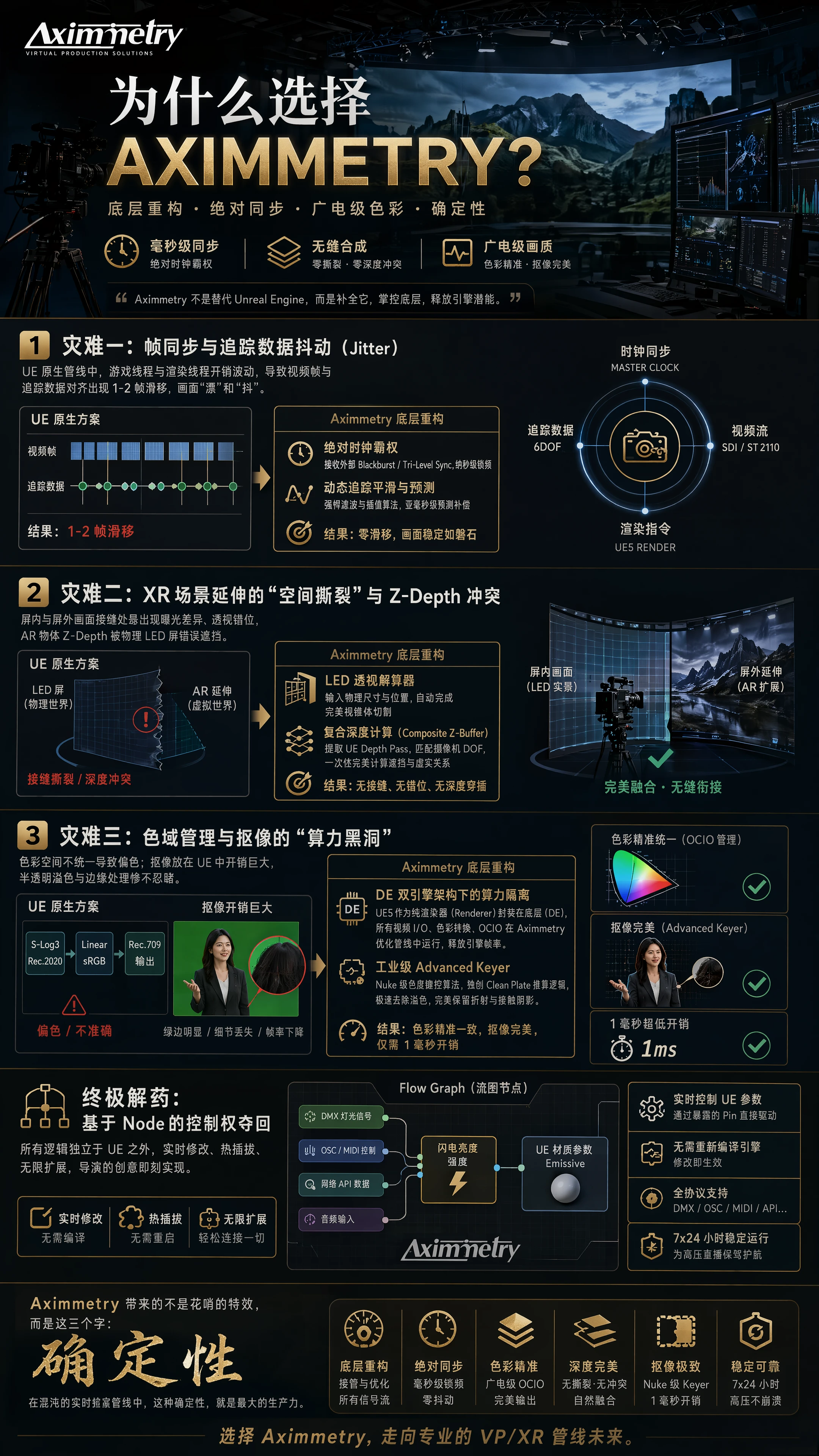
Disaster One: Frame Sync and Tracking Data Jitter
In an XR volume studio, the 6DOF data output by tracking systems (e.g., Mo-Sys, Ncam) and the camera's SDI/SMPTE ST 2110 video stream have a natural “time difference.”
If you use UE's native Live Link to ingest tracking data and then use Composure for compositing, you'll encounter a fatal issue: because UE's Game Thread and Render Thread overhead fluctuates dynamically, video frames and tracking data often experience a slight slip of 1-2 frames during alignment. On screen, this manifests as the background subtly “drifting” and “shaking.”
Aximmetry's underlying restructuring: Aximmetry bypasses UE's I/O module entirely. It is itself an extremely lightweight, clock-based, strongly synchronized underlying graphics framework.
- Absolute clock dominance: Aximmetry positions itself as the synchronization Master of the entire studio (or receives external Blackburst/Tri-Level Sync signals). At the lowest level, it locks the video frame input, tracking data stream, and engine rendering commands at the nanosecond level.
- Dynamic tracking smoothing and prediction: It incorporates extremely powerful tracking filters and interpolation algorithms. When faced with raw tracking data containing noise, Aximmetry not only instantly smooths out the noise but also performs sub-millisecond prediction compensation based on the acceleration of camera movement. This completely eliminates background trailing and jitter during camera pans.
Disaster Two: “Spatial Tearing” and Z-Depth Conflicts in XR Scene Extensions
In LED volume shooting, once the camera pans beyond the screen, we need to perform Set Extension (i.e., AR extension of the off-screen image).
In the native pipeline, achieving this is extremely painful. You need to precisely calculate the 3D mesh of the LED screen in the physical world, then perform complex frustum culling and masking in the engine. Any slight misstep can result in exposure differences, perspective misalignment at the seam between the on-screen and off-screen AR images, or the Z-Depth of AR objects (e.g., falling virtual snowflakes) being incorrectly occluded by the physical LED screen.
Aximmetry's underlying restructuring: Aximmetry's logic is to topologically separate the “physical screen” and “virtual world” before rendering.
- LED Perspective Solver: It includes a highly precise LED wall solving node. Simply input the physical dimensions and position of the screen, and Aximmetry automatically performs perfect frustum cutting outside the engine.
- Composite Z-Buffer: When processing foreground AR (e.g., a dragon flying in front of the host), Aximmetry directly extracts UE's Depth Pass and matches it with the camera's depth of field (DOF) parameters. This means the focus blur of the AR object and its occlusion relationship with the physical table are perfectly calculated in one go within the compositing node. No seams, no depth interpenetration.
Disaster Three: Color Management and the “Computational Black Hole” of Keying”
Broadcast-grade production is extremely sensitive to color. The camera inputs S-Log3/Rec.2020, the UE engine uses Linear sRGB, and the final output must be Rec.709. If the color space mapping (OCIO) is not done correctly, the composited image will suffer from catastrophic color shifts.
In green screen shooting, a high-quality keyer is an absolute computational black hole. If you implement keying inside UE using material nodes, it not only consumes massive overhead and slows down the frame rate but also handles semi-transparent spill terribly.
Aximmetry's underlying restructuring: Aximmetry completely decouples image processing from UE's computational burden.
- Computational isolation under the DE dual-engine architecture: It treats UE5 purely as a “background/foreground renderer” encapsulated at the bottom layer (Aximmetry DE). Meanwhile, all high-intensity video I/O, color space conversion, and OCIO configuration run entirely within Aximmetry's own highly optimized image pipeline. This greatly frees up the engine's frame rate.
- Industrial-grade Advanced Keyer: This can be considered Aximmetry's killer feature. Its chroma keying algorithm is entirely on par with Nuke's level. Not only does it handle Luma and Chroma tolerance with extreme precision, but more importantly, it features a proprietaryClean Plate calculation logicEven if the green screen lighting on set is uneven, it can rapidly compute a perfect matte on the GPU, leaving no green edges and even perfectly preserving the refraction of a water glass and extremely subtle contact shadows. All of this requires only 1 millisecond of overhead.
Ultimate Solution: Regaining Control via Nodes
As a TD, nothing is more frustrating than the director suddenly demanding on set: “Can you bind the host's microphone volume to the brightness of the lightning in the virtual background?”
If you use UE Blueprints, you'd have to rewire, recompile, and test, and the entire system could crash due to a single error.
Aximmetry, with itsFlow Graph, completely regains control. Its node logic is independent of UE. You can not only modify parameters in UE materials in real-time through exposed pins directly in Aximmetry's interface but also use extremely simple nodes to instantly convert DMX lighting signals, OSC/MIDI control protocols, and network API data into variables that control the engine. No need to recompile the engine or restart the system. All logic modifications are hot-swappable and real-time.
Conclusion: Reject “Hodgepodge,” Embrace “Pipeline”
In the VP and XR industry, there are many software tools that can make visuals look good, but very few can ensure the system doesn't crash, drop frames, or deviate during 7x24 high-pressure live broadcasts.
Aximmetry is not meant to replace Unreal Engine, but to complement it. It acts like a cold, rigorous traffic controller, taking over all the chaotic signal flows on set. It restructures frame sync at the bottom layer, takes over color space, optimizes Z-Depth conflicts, and solves the computational allocation problem with its unparalleled keyer algorithm.
For real frontline technical teams, what Aximmetry brings is not some flashy effect, but these three words:DeterminismIn the chaotic real-time rendering pipeline, this determinism is the greatest productivity.

 简体中文
简体中文  English